


簡易QR碼
QR碼讀取函式庫
- 自動偵測圖像中的條碼
- 解碼模型1與模型2 QR碼,支援所有版本及等級
- 解碼微型QR碼
- 運作速度極快
- 具備卓越的抗噪、抗模糊與抗變形能力
- 錯誤偵測與修正功能
- 具備旋轉與翻轉不變性
- 採用分級標準進行列印品質驗證
- 多重條碼讀取功能
描述
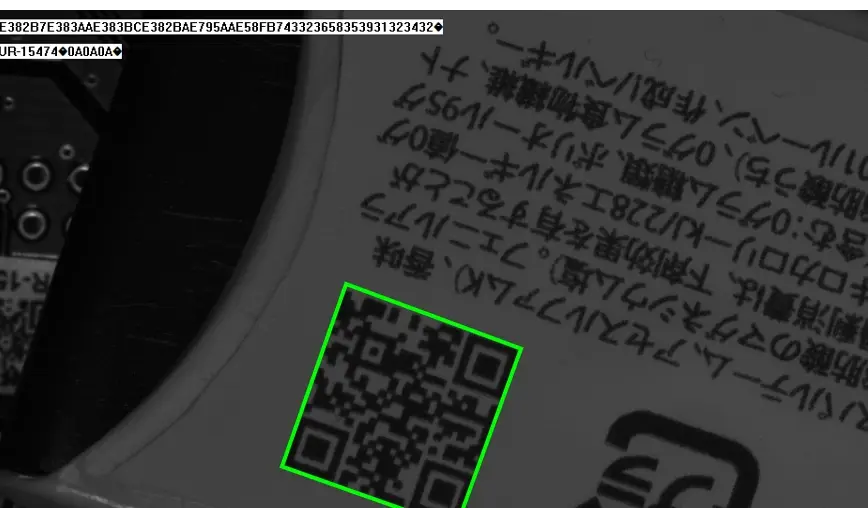
自動廣泛解碼
以下支援的資料類型:
- 資料:漢字、數字、字母數字、位元組及混合編碼 FNC1
- Model 1 QR 碼,所有版本(1-14),所有等級
- Model 2 QR 碼,所有版本(1-40),所有等級
- GS1 符號系統
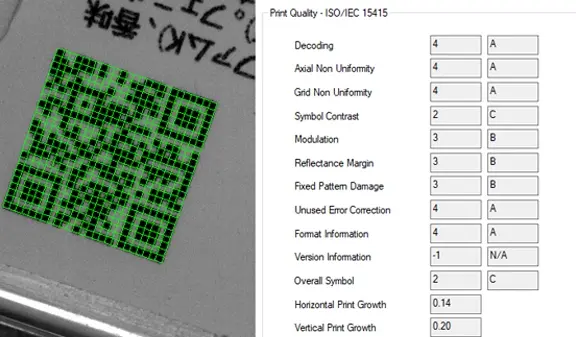
印刷品質驗證
EasyQRCode 會檢查 QR 碼的品質,並根據 ISO/IEC 15415 及 ISO/IEC TR 29158 標準所定義的指標進行計算。
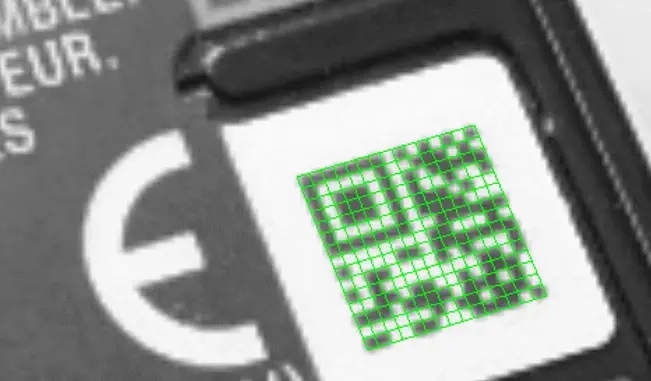
亦適用於微型QR碼
Open eVision 亦可透過其 EQRCodeReader 類別偵測並解碼微型 QR 碼。此為標準 QR 碼的精簡版本,適用於需編碼較少資料的情境。請使用最新版 Open eVision Studio 及範例程式進行驗證。
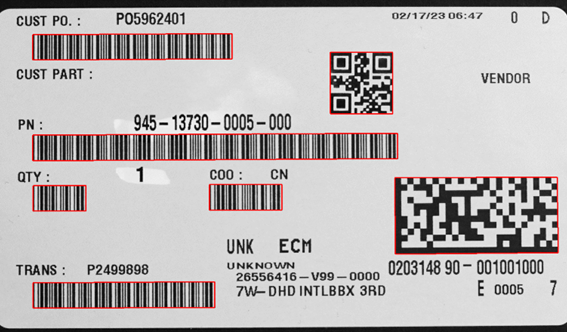
ECodeReader:一次掃描,讀取更多條碼
ECodeReader 透過整合 EasyMatrixCode2、EasyBarCode2 與 EasyQRCode 至單一簡潔的統一介面,簡化了在同一影像中讀取多種條碼類型的流程。某些應用場景中,讀取多種條碼類型是必要需求。過去執行此操作時,必須使用多組條碼讀取器(即每種條碼類型各配備一台)。 ECodeReader 透過整合 EasyMatrixCode2、EasyBarCode2 與 EasyQRCode 的強大功能,將此流程簡化為單一、簡潔且統一的介面。使用 ECodeReader,您只需單次方法呼叫即可讀取條碼、數據矩陣碼與 QR 碼。注意:ECodeReader 需具備 EasyMatrixCode、EasyBarCode 及 EasyQRCode 的授權許可。
其他好處
Neo 授權系統
Neo 是一套全新的授權系統。它可靠且技術先進,現已可用於儲存 eVision 和 eGrabber 授權。Neo 讓您能選擇在何處啟用授權,無論是透過 Neo 硬體金鑰,還是 Neo 軟體容器皆可。您先購買授權,之後再決定啟用方式。
Neo 授權金鑰具備堅固的硬體結構,並可靈活地在不同電腦之間移轉。Neo 軟體容器則無需任何專用硬體,而是與其被啟用的電腦綁定。
Neo 隨附專屬的 Neo 授權管理員,提供兩種使用模式:直觀且易於操作的圖形使用者介面,以及可輕鬆自動化 Neo 授權流程的命令列介面。
所有適用於 Windows 與 Linux 的 eVision 函式庫
- Microsoft Windows 11、10 適用於 x86-64 (64 位元) 處理器架構
- Microsoft Windows 11、10 IoT Enterprise 適用於 x86_64 系統
- 適用於 x86-64(64 位元)及 ARMv8-A(64 位元)處理器架構的 Linux,需具備 glibc 2.18 或更高版本
DPM - 直接零件標記
EasyQRCode 演算法經過特別優化,專門用於讀取直接零件標記。該技術支援因點擊標記、雷射標記、噴墨印刷或電化學蝕刻等工藝,在各類材料上形成的低對比度與變形條碼。
eVision Studio
eVision Studio 是 eVision 的評估、原型設計與開發工具。
其直觀的圖形化使用者介面,讓您能夠呼叫 eVision 的任何 2D 影像處理函式,並立即查看結果。其腳本功能可產生對應的程式碼,您可將該程式碼複製並貼上至您的應用程式中。
eVision Studio 完全免費(適用於 eVision 2.0 及以上版本),且無需任何授權。


Software
- Host PC Operating System
-
eVision is a set of 64-bit libraries that require an Intel compatible processor with the SSE4 instruction set or an ARMv8-A compatible processor.
eVision can be used on the following operating systems:
Microsoft Windows 11, 10 for x86-64 (64-bit) processor architecture
Microsoft Windows 11, 10 IoT Enterprise for x86-64 systems
Linux for x86-64 (64-bit) and ARMv8-A (64-bit) processor architectures with a glibc version greater or equal to 2.18
Remote connections
Remote connections are allowed using remote desktop, TeamViewer or any other similar software.
Virtual machines
Virtual machines are supported. Microsoft Hyper-V, Oracle VirtualBox and libvirt hypervisors have been successfully tested.
Only the Neo Licensing System is compatible with virtualization.
Minimum requirements:
2 GB RAM to run an eVision application
8 GB RAM to compile an eVision application
Between 100 MB and 2 GB free hard disk space for libraries, depending on selected options.
- APIs
-
Supported programming languages :
The eVision libraries and tools support C++, Python and the programming languages compatible with the .NET (C#, VB.NET)
C++ requirements: A compiler compatible with the C++ 11 standard is required to use eVision
Python requirements: Python 3.11 or later is required to use the Python bindings for eVision
.NET requirements: .NET framework 4.8 (or later) or the .NET platform 6.0 (or later) are supported
Supported Integrated Development Environments:
Microsoft Visual Studio 2017 (C++, C#, VB .NET, C++/CLI)
Microsoft Visual Studio 2019 (C++, C#, VB .NET, C++/CLI)
Microsoft Visual Studio 2022 (C++, C#, VB .NET, C++/CLI)
QtCreator 4.15 with Qt 5.12
Ordering Information
- Product status
-
Released
- Product code - Description
-
PC4175 Open EasyQRCode for USB dongle
PC4325 Open eVision EasyQRCode
- Related products
-
PC6512 eVision/Open eVision USB Dongle (empty)
PC6514 Neo USB Dongle (empty)