



- 단일 및 이중 레이저 라인 추출을 통한 깊이 맵 생성
- 레이저 삼각 측량 설정을 위한 편리하고 강력한 3D 보정
- Coaxlink Quad 3D-LLE 및 Coaxlink Quad CXP-12 3D-LLE 프레임 그래버와 호환
설명
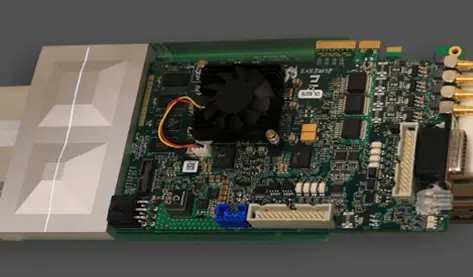
3D 레이저 라인 추출을 통한 깊이 맵 생성
Easy3D는 검사 대상물에 투사된 레이저 라인이 포함된 일련의 이미지로부터 깊이 맵을 생성합니다. 결과 깊이 맵의 각 픽셀은 이미지 내 레이저 라인의 위치를 포함합니다. 여러 추출 모드와 다양한 필터가 지원됩니다. 이 소프트웨어 라인 추출기는 Coaxlink Quad 3D-LLE 프레임 그래버의 하드웨어 구현과 완벽하게 호환됩니다.
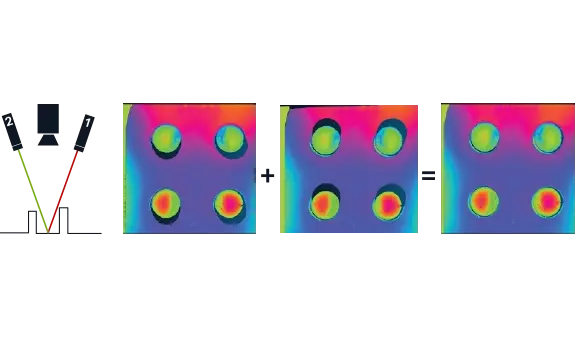
이중 레이저 라인 추출
소프트웨어 및 하드웨어 구현을 통해 지원되는 이중 레이저 라인 추출 프로세스는 가림 현상의 영향을 줄입니다. 가림 현상은 물체의 일부가 어떤 레이저에도 조명을 받지 않을 때 발생합니다. 서로 다른 각도의 두 레이저를 사용하면 이러한 정의되지 않은 영역을 줄일 수 있습니다. Easy3DLaserLine에 포함된 객체 기반 보정을 통해 획득한 데이터를 단일 보정된 포인트 클라우드로 결합할 수 있습니다.
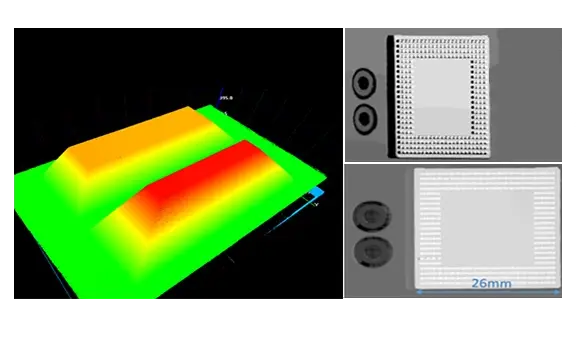
교정
일부 처리는 깊이 맵에서 직접 수행될 수 있습니다. 그러나 대부분의 3D 측정은 왜곡 없는 데이터와 계량적 표현이 필요하므로, 레이저 삼각 측량 설비의 보정이 필수적입니다. Easy3D는 깊이 맵에 적용되는 보정 모델을 계산하여 이를 보정된 3D 포인트 클라우드로 변환합니다. 이 보정 모델은 보정이 필요한 레이저 삼각 측량 설비를 사용하여 획득한 기준 물체의 깊이 맵을 기반으로 합니다.
기타 혜택
네오 라이선싱 시스템
네오는 새로운 라이선싱 시스템입니다. 신뢰할 수 있고 최첨단이며, 이제 Open eVision 및 eGrabber 라이선스를 저장할 수 있습니다. 네오를 사용하면 라이선스를 활성화할 위치를 선택할 수 있습니다. 네오 동글에서 활성화하거나 네오 소프트웨어 컨테이너에서 활성화할 수 있습니다. 라이선스를 구매한 후 나중에 결정하면 됩니다.
네오 동글은 견고한 하드웨어를 제공하며 컴퓨터 간 이동이 가능합니다. 네오 소프트웨어 컨테이너는 전용 하드웨어가 필요하지 않으며, 활성화된 컴퓨터에 연결됩니다.
Neo는 자체 전용 Neo 라이선스 관리자를 함께 제공합니다. 이 관리자는 두 가지 형태로 제공됩니다: 직관적이고 사용하기 쉬운 그래픽 사용자 인터페이스(GUI)와 Neo 라이선싱 절차를 쉽게 자동화할 수 있는 명령줄 인터페이스(CLI)입니다.
Windows 및 Linux용 모든 Open eVision 라이브러리
- Microsoft Windows 11, 10 for x86-64 (64비트) 프로세서 아키텍처
- x86_64 시스템용 Microsoft Windows 11, 10 IoT Enterprise
- x86-64(64비트) 및 ARMv8-A(64비트) 프로세서 아키텍처용 Linux (glibc 버전 2.18 이상)
Open eVision 3D Studio
Open eVision 3D Studio는 Open eVision의 3D 평가 및 프로토타이핑 애플리케이션 도구입니다. Open eVision
3D Studio 애플리케이션은 Coaxlink Quad 3D-LLE 프레임 그래버와 Easy3D 및 Easy3DLaserLine 라이브러리를 사용하여 단일 및 이중 3D 레이저 라인 검사 시스템의 구성을 획기적으로 간소화합니다.
Open eVision 3D Studio는 무료이며 라이선스가 필요하지 않습니다.
Software
- Host PC Operating System
-
Open eVision is a set of 64-bit libraries that require an Intel compatible processor with the SSE4 instruction set or an ARMv8-A compatible processor.
Open eVision can be used on the following operating systems:
Microsoft Windows 11, 10 for x86-64 (64-bit) processor architecture
Microsoft Windows 11, 10 IoT Enterprise for x86-64 systems
Linux for x86-64 (64-bit) and ARMv8-A (64-bit) processor architectures with a glibc version greater or equal to 2.18
Remote connections
Remote connections are allowed using remote desktop, TeamViewer or any other similar software.
Virtual machines
Virtual machines are supported. Microsoft Hyper-V, Oracle VirtualBox and libvirt hypervisors have been successfully tested.
Only the Neo Licensing System is compatible with virtualization.
Minimum requirements:
2 GB RAM to run an Open eVision application
8 GB RAM to compile an Open eVision application
Between 100 MB and 2 GB free hard disk space for libraries, depending on selected options.
- APIs
-
Supported programming languages :
The Open eVision libraries and tools support C++, Python and the programming languages compatible with the .NET (C#, VB.NET)
C++ requirements: A compiler compatible with the C++ 11 standard is required to use Open eVision
Python requirements: Python 3.11 or later is required to use the Python bindings for Open eVision
.NET requirements: .NET framework 4.8 (or later) or the .NET platform 6.0 (or later) are supported
Supported Integrated Development Environments:
Microsoft Visual Studio 2017 (C++, C#, VB .NET, C++/CLI)
Microsoft Visual Studio 2019 (C++, C#, VB .NET, C++/CLI)
Microsoft Visual Studio 2022 (C++, C#, VB .NET, C++/CLI)
QtCreator 4.15 with Qt 5.12
Ordering Information
- Product status
-
Released
- Product code - Description
-
PC4186 Open Easy3DLaserLine for USB dongle
PC4336 Open eVision Easy3DLaserLine
- Included libraries
-
Easy3D
Easy3DLaserLine
- Related products
-
PC1637 Coaxlink Quad 3D-LLE
PC6512 eVision/Open eVision USB Dongle (empty)
PC6514 Neo USB Dongle (empty)