


- 特徴点技術を用いたパターンマッチング
- 画像またはDXFベクトルモデルからの学習
- 完全自動化、高速かつ堅牢
- 回転・拡大縮小に対する不変性
- パターン劣化に対する高い許容度
- 「無視領域」のサポート
説明
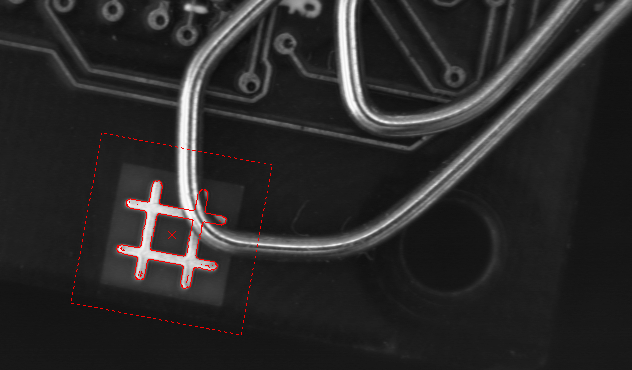
革新的な特徴点技術に基づくEasyFindは、画像内の参照モデルのインスタンスを1つ以上迅速に検出するよう設計されています。正規化相関と比較して、EasyFindは処理速度が速く、頑健性が向上しています。ノイズ、ぼけ、遮蔽、欠損部分、不安定な照明条件により著しく劣化しているインスタンスの処理においても優れた性能を発揮します。
サブピクセル精度
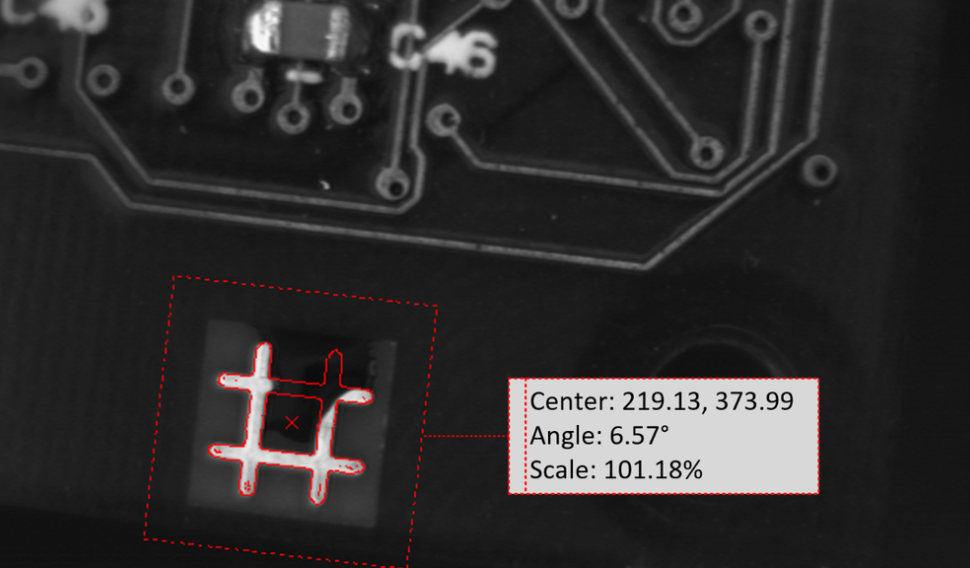
EasyFindはサブピクセルレベルまで調整可能な精度で、検出されたインスタンスの位置、回転角度、スケール、マッチングスコアといった極めて精密な情報を報告します。
高速処理と強化された堅牢性
EasyFindは新規の特徴点技術に基づいています。参照モデルとサンプル画像を画素単位で比較する代わりに、モデル内の顕著な特徴を慎重に選択します。この手法により、EasyFindは有用な情報を伝える領域のみをマッチングさせることが可能となり、処理速度の向上と大幅な堅牢性の改善を実現しています。
「無関心」領域
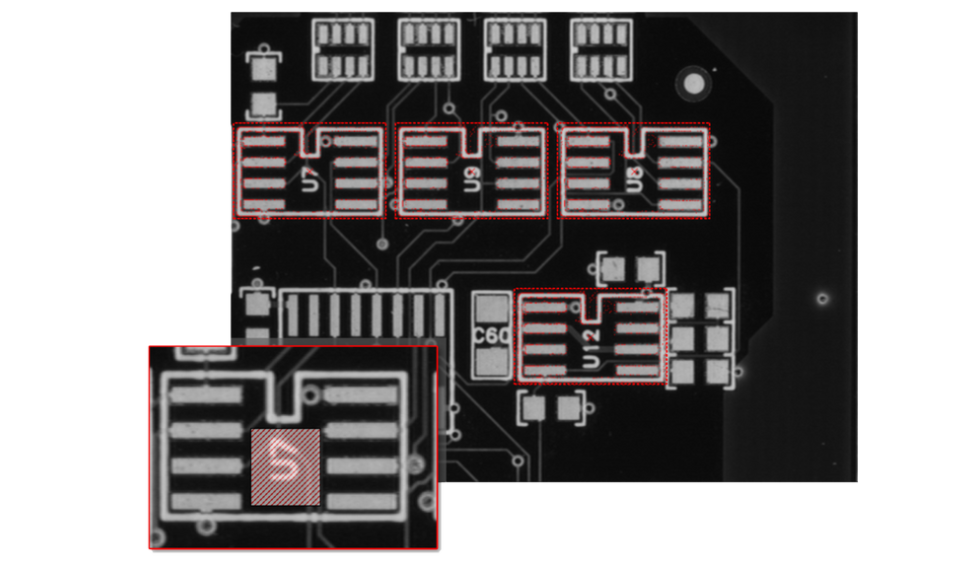
EasyFindは「無視領域」をサポートしています。この機能により、複雑なパターン形状の作成が可能になります。
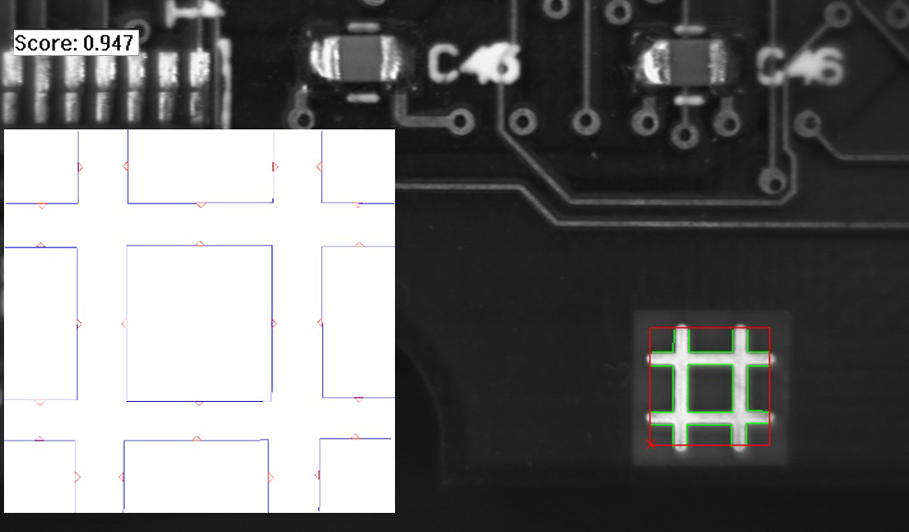
ベクトルパターンのトレーニング
このモードでは、ラスタライズされたパターンではなく、2D幾何形状の集合に対して学習が行われます。学習モデルは、新しいクラスEVectorModelを使用して構築されます。これは、DXFファイルから読み込むか、プログラム的にOpen eVision EShapeオブジェクトを使用することで実現されます。この拡張機能は、既知の形状を持つ物体を見つけるのに適しています。
その他の特典
ネオ・ライセンシング・システム
Neoは新しいライセンスシステムです。信頼性が高く、最先端の技術を採用しており、Open eVisionおよびeGrabberのライセンスを保存するために利用可能になりました。Neoでは、ライセンスをNeoドングル上でアクティベートするか、Neoソフトウェアコンテナ内でアクティベートするかを選択できます。ライセンスを購入し、後で決定できます。
Neoドングルは堅牢なハードウェアを提供し、コンピュータ間での転送が可能な柔軟性を備えています。Neoソフトウェアコンテナは専用ハードウェアを必要とせず、代わりにアクティベーションされたコンピュータに紐付けられます。
Neoには専用のNeoライセンスマネージャーが同梱されており、直感的で使いやすいグラフィカルユーザーインターフェースと、Neoライセンス手続きの自動化を容易にするコマンドラインインターフェースの2種類が用意されています。
WindowsおよびLinux向けOpen eVisionライブラリ一式
- Microsoft Windows 11、10 for x86-64 (64ビット) プロセッサアーキテクチャ
- x86_64 システム上の Microsoft Windows 11、10 IoT Enterprise
- Linux for x86-64 (64ビット) および ARMv8-A (64ビット) プロセッサアーキテクチャ(glibc バージョン 2.18 以上)
Open eVision Studio
Open eVision Studioは、Open eVisionの評価、プロトタイピング、開発ツールです。
直感的なグラフィカルユーザーインターフェースにより、eVisionのあらゆる2D画像処理機能を呼び出し、その結果を即座に確認できます。スクリプト機能は対応するコードを生成し、それをアプリケーションにコピー&ペーストできます。
Open eVision Studioは無料(Open eVision 2.0以降を使用する場合)で、ライセンスは一切不要です。



Software
- Host PC Operating System
-
Open eVision is a set of 64-bit libraries that require an Intel compatible processor with the SSE4 instruction set or an ARMv8-A compatible processor.
Open eVision can be used on the following operating systems:
Microsoft Windows 11, 10 for x86-64 (64-bit) processor architecture
Microsoft Windows 11, 10 IoT Enterprise for x86-64 systems
Linux for x86-64 (64-bit) and ARMv8-A (64-bit) processor architectures with a glibc version greater or equal to 2.18
Remote connections
Remote connections are allowed using remote desktop, TeamViewer or any other similar software.
Virtual machines
Virtual machines are supported. Microsoft Hyper-V, Oracle VirtualBox and libvirt hypervisors have been successfully tested.
Only the Neo Licensing System is compatible with virtualization.
Minimum requirements:
2 GB RAM to run an Open eVision application
8 GB RAM to compile an Open eVision application
Between 100 MB and 2 GB free hard disk space for libraries, depending on selected options.
- APIs
-
Supported programming languages :
The Open eVision libraries and tools support C++, Python and the programming languages compatible with the .NET (C#, VB.NET)
C++ requirements: A compiler compatible with the C++ 11 standard is required to use Open eVision
Python requirements: Python 3.11 or later is required to use the Python bindings for Open eVision
.NET requirements: .NET framework 4.8 (or later) or the .NET platform 6.0 (or later) are supported
Supported Integrated Development Environments:
Microsoft Visual Studio 2017 (C++, C#, VB .NET, C++/CLI)
Microsoft Visual Studio 2019 (C++, C#, VB .NET, C++/CLI)
Microsoft Visual Studio 2022 (C++, C#, VB .NET, C++/CLI)
QtCreator 4.15 with Qt 5.12
Ordering Information
- Product status
-
Released
- Product code - Description
-
PC4158 Open EasyFind for USB dongle
PC4308 Open eVision EasyFind
- Related products
-
PC6512 eVision/Open eVision USB Dongle (empty)
PC6514 Neo USB Dongle (empty)