


EasyOCR
光学式文字認識ライブラリ
- 最も信頼性が高く高速な認識を実現する学習可能な文字認識
- 文字サイズに依存しない
- 印刷不良や破損した文字にも耐性あり
- 「連結」文字の分離
- プリセットフォント付属
説明
EasyOCRは、テンプレートマッチングアルゴリズムに基づくフォント依存型の印刷文字認識装置です。ラベルや部品本体に印刷されたあらゆる種類の短いテキスト(部品番号、シリアル番号、有効期限、製造年月日、ロットコードなど)を読み取るよう設計されています。
トレーニング
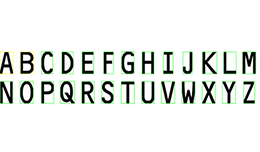
EasyOCRは認識対象のフォントを学習させる必要があります。サンプル画像から読み取り可能な全文字を学習できるため、認識精度が極めて柔軟かつ高速で信頼性が高くなります。学習段階では対話型アプリケーションを使用し、文字サンプルを表示してライブラリがそれらを学習・フォントファイルに保存します。さらにEasyOCRは独自のカスタムフォントエディタを作成する手段を提供します。 EasyOCRには、標準的なOCR-A、OCR-B、Semiフォント用に事前に学習済みの3つの標準フォントファイルが付属しています。
その他のメリット
ネオ・ライセンシング・システム
Neoは新しいライセンスシステムです。信頼性が高く、最先端の技術を搭載しており、eVisionおよびeGrabberのライセンスを保存できるようになりました。Neoでは、NeoドングルかNeoソフトウェアコンテナのどちらでライセンスをアクティベートするかを選択できます。ライセンスを購入した時点で、後で決めることも可能です。
Neoドングルは堅牢なハードウェアであり、コンピュータ間で転用できる柔軟性を備えています。Neoソフトウェアコンテナは専用のハードウェアを必要とせず、代わりにアクティベーションが行われたコンピュータに紐付けられます。
Neoには専用の「Neo License Manager」が付属しており、直感的で使いやすいグラフィカルユーザーインターフェース(GUI)と、Neoのライセンス手続きを簡単に自動化できるコマンドラインインターフェース(CLI)の2種類が用意されています。
WindowsおよびLinux向けすべてのeVisionライブラリ
- Microsoft Windows 11、10 for x86-64 (64ビット) プロセッサアーキテクチャ
- x86_64 システム上の Microsoft Windows 11、10 IoT Enterprise
- Linux for x86-64 (64ビット) および ARMv8-A (64ビット) プロセッサアーキテクチャ(glibc バージョン 2.18 以上)
eVision Studio
eVision Studioは、eVisionの評価、プロトタイピング、および開発ツールです。
その直感的なグラフィカルユーザーインターフェースにより、eVisionの2D画像処理機能のいずれでも呼び出し、その結果を即座に確認することができます。スクリプト機能により対応するコードが生成され、それをコピーしてアプリケーションに貼り付けることができます。
eVision Studioは(eVision 2.0以降を使用する場合)、無料で利用でき、ライセンスも不要です。



Software
- Host PC Operating System
-
eVision is a set of 64-bit libraries that require an Intel compatible processor with the SSE4 instruction set or an ARMv8-A compatible processor.
eVision can be used on the following operating systems:
Microsoft Windows 11, 10 for x86-64 (64-bit) processor architecture
Microsoft Windows 11, 10 IoT Enterprise for x86-64 systems
Linux for x86-64 (64-bit) and ARMv8-A (64-bit) processor architectures with a glibc version greater or equal to 2.18
Remote connections
Remote connections are allowed using remote desktop, TeamViewer or any other similar software.
Virtual machines
Virtual machines are supported. Microsoft Hyper-V, Oracle VirtualBox and libvirt hypervisors have been successfully tested.
Only the Neo Licensing System is compatible with virtualization.
Minimum requirements:
2 GB RAM to run an eVision application
8 GB RAM to compile an eVision application
Between 100 MB and 2 GB free hard disk space for libraries, depending on selected options.
- APIs
-
Supported programming languages :
The eVision libraries and tools support C++, Python and the programming languages compatible with the .NET (C#, VB.NET)
C++ requirements: A compiler compatible with the C++ 11 standard is required to use eVision
Python requirements: Python 3.11 or later is required to use the Python bindings for eVision
.NET requirements: .NET framework 4.8 (or later) or the .NET platform 6.0 (or later) are supported
Supported Integrated Development Environments:
Microsoft Visual Studio 2017 (C++, C#, VB .NET, C++/CLI)
Microsoft Visual Studio 2019 (C++, C#, VB .NET, C++/CLI)
Microsoft Visual Studio 2022 (C++, C#, VB .NET, C++/CLI)
QtCreator 4.15 with Qt 5.12
Ordering Information
- Product status
-
Released
- Product code - Description
-
PC4155 Open EasyOCR for USB dongle
PC4305 Open eVision EasyOCR
- Related products
-
PC6512 eVision/Open eVision USB Dongle (empty)
PC6514 Neo USB Dongle (empty)